Video game console repair: 7 warning signs your console needs professional attention
Video game console repair costs less and works better when it starts early. A console rarely fails without warning. It usually gives small hints first, such as a louder fan or a picture that flickers. At Gadget Rescue in Calgary, we often see consoles arrive after months of ignored symptoms, and by then a simple fix has often become a larger one. Spotting the signs early protects your hardware and your saved games.
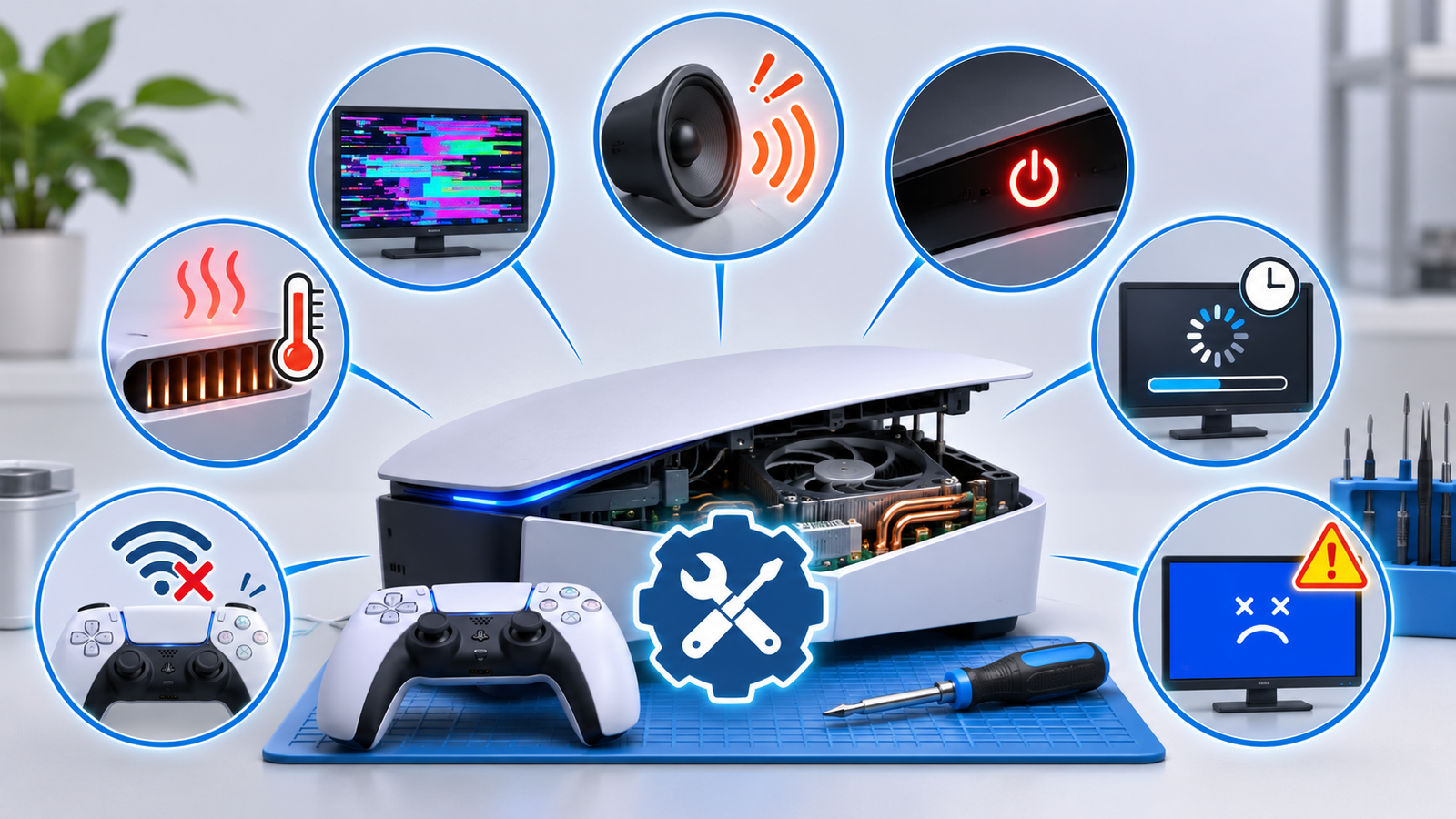
Seven warning signs that call for video game console repair
A console needs professional attention when the same fault returns after a restart and a basic reset. One odd moment is usually a glitch. A repeating fault points to hardware.
1. Constant overheating and a loud fan
A fan that roars for more than a few minutes is asking for help. Dust blocks the vents, and dried thermal paste (the compound that carries heat away from the processor) stops working well. We often see this in consoles that are three or four years old. A technician can clear the dust and replace the paste before heat damages the board.
2. Sudden shutdowns or freezing
A console that switches off in the middle of a game usually has a heat problem or a failing power supply. Try a different wall outlet first. If the shutdowns continue, stop using the console, because repeated power cuts can corrupt your saved data.
3. A disc drive that will not read or eject
Clicking sounds or discs that spin and come straight back out point to a worn drive. A dirty lens causes some of these faults. A weak laser or damaged motor causes many more. Both need a technician, since the drive sits deep inside the case.
4. No picture or a flickering screen
A black screen with a lit power button often points to a damaged HDMI port, the socket that sends video to your TV. Test another cable and another TV input first. If the problem stays, the pins inside the port may be bent. Fixing them means soldering, which is joining metal parts with heat, and that is a job for a trained technician.
5. A burning smell or a swollen power brick
A burning smell is the most serious sign on this list. Unplug the console immediately and do not switch it on again. Electrical faults can start fires. The same warning applies to a power brick (the box on the cable) that feels very hot, buzzes or looks swollen.
6. Controllers, ports or WiFi that stop working
A controller that will not connect or charge and sticks that drift are common faults. Drift means the cursor moves without any touch, and replacing the stick module often fixes it. Weak or dropping WiFi can come from a faulty wireless card inside the console.
7. Error codes that keep returning
One error code after an update can be a glitch. The same code three times is a warning. Boot errors and storage warnings often point to a failing drive or a faulty board. You can look up the meaning of a code on the official Xbox Support site before you decide what to do next.
What you can safely try at home
Some checks need no tools. Back up your saves to the cloud or an external drive first, because resets and repairs can wipe local data.
- Unplug the console for 30 seconds, then restart it.
- Swap the HDMI cable and try another TV input.
- Brush dust from the outside vents with a soft brush.
- Place the console in open space with room for airflow.
Never open the casing yourself. The power supply can hold a charge after you unplug it, and opening the case may end your warranty. For deeper faults, professional console repair is the safer route.
When video game console repair is not worth it
Repair does not always make sense. If a console is more than eight years old, has serious water damage or needs a repair that costs close to a new unit, replacement is often the better choice. We will tell you that plainly. Gadget Rescue runs diagnostics before any work begins and gives you a clear quote first, so you decide with full information.
Console repair near me: what to expect in Calgary
Gadget Rescue provides gaming console repair in Calgary with diagnostics first and a clear quote before any work starts.
People who search for gaming console repair near me usually want a fast answer and a local team. A local shop also removes the risk of shipping a fragile device. Bring the console, its power cable and the controller you use. Also describe when the fault appears, because details such as noise or timing help the technician find the cause faster.
Our team repairs mobiles, laptops, MacBooks, TVs and other devices, so one visit can cover more than a console. You can book online in a few minutes.
Get your console checked by Gadget Rescue
If your console shows even one of these signs, act before the fault spreads. Gadget Rescue offers honest diagnostics and experienced technicians, delivered locally in Calgary, with a clear quote before any work begins. Contact Gadget Rescue today for video game console repair that puts your console and your saves first.
Frequently Asked Questions
1. How do I know if my console needs repair?
Your console needs repair when a fault returns after a restart and a reset. Common signs include overheating, sudden shutdowns, no picture, disc read errors and a burning smell. Stop using the console if you smell burning.
2. Where can I find console repair near me in Calgary?
Gadget Rescue offers console repair in Calgary. The team runs diagnostics first and gives a clear quote before any work starts, so you know the cost and the fault before you approve a repair.
3. Can overheating damage a console permanently?
Yes. Long term heat can damage the processor, memory chips and solder joints on the board. Cleaning dust and replacing dried thermal paste early can prevent further damage. Waiting until the console shuts down repeatedly makes repair harder and costlier.
4. Should I back up my data before console repair?
Yes. Back up saves to the cloud or an external drive before any repair or factory reset. Most repairs leave data untouched, but a faulty drive can fail at any time, so a backup protects your progress.
5. When is it better to replace a console than repair it?
Replacement makes sense when the console is very old, has serious water or board damage, or the repair quote comes close to the price of a new unit. A technician can confirm this after diagnostics.